


2026 Advanced FECFile for Candidate Committees participant information page
Follow these step-by-step instructions to participate in the webinar. For questions, please contact the Information Division at 1-800-424-9530, menu option 6.
Step-by-step instructions
STEP 1: Download materials
STEP 2: Log-in to webinar.
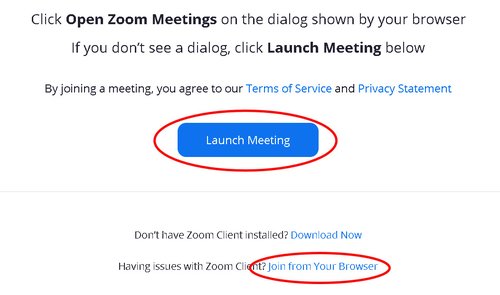
Use the link below to join the webinar. Click the dialog box asking to open Zoom Meetings. If it does not pop up, click "Launch Meeting" as pictured below. Alternatively, you may open Zoom and "Join Meeting" by entering the webinar ID and passcode below. There is also an option to "Join from Your Browser" if you are having difficulty.
https://fecgov.zoomgov.com/j/1607006520
Webinar ID: 160 700 6520
Passcode: 431523
STEP 3: After the workshop, follow the link provided by moderator to offer feedback.
Advanced FECFile for Candidate Committees Webinar Agenda
Wednesday, June 17, 2026
| Workshop & Time | Presenters | Moderators |
|---|---|---|
| Advanced FECFile Webinar for Candidate Committees 1:00 p.m. - 3:00 p.m. Eastern Time |
Patrick Harkins Chris Jones |
Bradley Austin Ryan Furman |