


How to use FEC legal search systems
This guide explains how to use the FEC legal search systems. This guide covers: Statutes, Regulations, Advisory Opinions, Matters Under Review, Alternative Dispute Resolutions and Administrative Fines.
Search across legal resources
Search for legal documents in a single database or across all databases at once.
To search a topic across legal data sets, a good place to start is the search across all legal resources landing page. Advanced searches for different types of legal documents are available to further refine a search.
There are two basic ways to search through the different matters: by the matter’s unique number, or a keyword search. The advanced search interface provides more filter options, some of which may be unique to the type of legal matter.
Keyword search details
In any SEARCH BY KEYWORD field, use the symbols + (and), | (or), “” (exact phrase) and - (but not) to refine or limit the search.
Boolean terms and operators
Within a keyword search, users may use Boolean terms and other operators, which can query a document using specific commands.
| Operator | Command | Examples |
|---|---|---|
| * | Searches a word with multiple endings (-ing, -ed) | coordinate* will search a document for coordinate, coordinates and coordinated coordinat* will search a document for coordinate, coordinates, coordinated, coordination and coordinator |
| + | Searches documents containing more than one word | express + coordinated will return documents containing both words |
| | | Searches documents containing word preceding the | operator or the word following the operator | accept | direct will return documents containing accept or direct |
| “ ” | Conducts an exact string search for the words or phrase included in quotation marks | “election or defeat of” will return documents containing that exact string of words |
| - | Searches preceding term but not the subsequent term | direction -control will return documents containing the word direction but not containing the word control |
| ~N | Fuzzy search returns results that are similar to, rather than exactly matching, a search query. Here, N represents the allowed number of character differences between the search term and responsive results. N=1 means that the result can be one letter off from the search term, N=2 means the result can be two letters off. | Misissippi~1 will return Mississippi Misisipi~3 will return Mississippi |
Proximity search
A proximity search filter is available for certain datasets, which currently include Closed Matters Under Review, Advisory Opinions, Alternative Dispute Resolutions, Administrative Fines and Rulemakings. This filter searches for two terms or phrases that appear within a set distance from one another. To use the filter, enter the first keyword or exact phrase in the first search bar and the second keyword or exact phrase in the second search bar. (Do not use quotation marks with words or phrases in the proximity search fields.) Then select a numerical value, which represents the desired maximum number of words between the two chosen keywords or exact phrases. E.g., typing contributions in the first text field, excessive in the second text field, and setting the numerical value to 3 will return any documents where the words “contributions” and “excessive” appear with no more than 3 words separating them from one another.
For this filter, please note that the proximity terms will not be highlighted in the search results. Within the results, a list of resulting documents will appear underneath each matter that returned results of the proximity search. For more precise searches, consider using the proximity search in conjunction with keyword search or other tools.
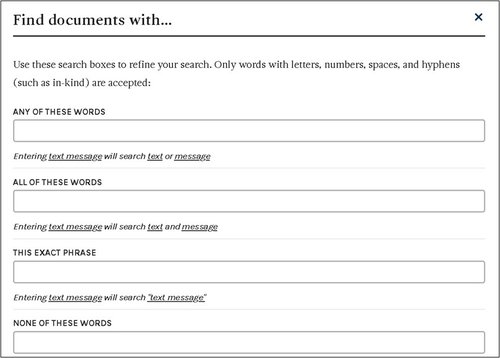
Boolean filters
Alternatively, use “Boolean filters” box to refine your search. Within the “Boolean filters” interface, users cannot also use +, |, “”, -, Boolean terms and operators or proximity search features.
Statute search
The Statutes search includes the Federal Election Campaign Act (52 U.S.C. §§ 30101 to 30146), the Presidential Election Campaign Fund Act (26 U.S.C. §§ 9001 to 9013) and the Presidential Primary Matching Payment Account Act (26 U.S.C. §§ 9031 to 9042). It contains a keyword search and Boolean filter options that can be used to locate particular sections of a statute.
Regulations search
Commission regulations are codified at Title 11 of the Code of Federal Regulations. The Regulations search page contains a keyword search and expanded keyword options that can be used to locate a particular section of the regulations. Separately, the FEC’s Searchable Electronic Rulemaking System (SERS) is available to search documents related to completed and ongoing Commission rulemakings.
Closed Matters Under Review (MURs) search
The Closed Matters Under Review (MUR) search contains several search methods and a series of filters to narrow search results. Enforcement cases are primarily handled by the Office of General Counsel and are known as MURs. Note on Archived MURs: Due to data limitations, MURs closed prior to 2000 cannot be searched by document type or case details. These MURs are marked as archived in search results. MUR documents can be located through different search methods and filters:
Keyword
Use keywords (and other terms and operators) to search MUR documents. For more precise results, include keywords in conjunction with other available filters.
MUR Number
Each MUR is assigned a number based on the chronological order in which they are received, and this filter is helpful to locate specific documents if the MUR number is known. MUR numbers ending in “R” (e.g., MUR #1234R) indicate that the matter was remanded to the Commission following a court order.
MUR Respondents
A MUR respondent is a person or entity against whom a violation has been alleged. The fact that an entity or person has been designated a “respondent” at the outset of an enforcement matter does not mean that the Commission has made a finding or otherwise believes that a violation has occurred or is about to occur.
Document type filter options
Users may limit their search to one or more particular types of documents using this filter. Combining this filter with the keyword, MUR number or MUR respondent search will assist users looking only for certain types of documents in a particular matter.
Conciliation and Settlement Agreements: This category includes final Conciliation Agreements. The Commission seeks the payment of civil penalties through voluntary settlements. If the General Counsel and the respondent enter into a conciliation agreement, the written agreement becomes effective once it is approved by the affirmative vote of four Commissioners and signed by the respondent and the General Counsel.
Complaint, Responses, Designation of Counsel and Extensions of Time: This category includes documents originating a matter, such as complaints and internal Agency referrals; the respondents’ responses to the allegations in the complaint or referral; documents in which respondents designate counsel; and documents pertaining to requests for and extensions of time (tolling agreements).
General Counsel Reports, Briefs, Notifications and Responses: This category includes General Counsel’s Reports, General Counsel’s Briefs, notifications sent by the Agency to complainants and respondents regarding Commission findings and responses to Commission notifications and General Counsel’s Briefs. A General Counsel’s Report is a recommendation by the Agency’s Office of General Counsel to the Commission regarding whether there is “reason to believe” the respondent has committed or is about to commit a violation of the law. A General Counsel’s Brief is a recommendation by the Office of General Counsel to the Commission regarding whether there is “probable cause to believe” the respondent has committed or is about to commit a violation of the law. Responses are respondents’ responses to a General Counsel’s Brief.
Certifications: This category includes Certifications, which are documents recording Commission votes.
Civil Penalties, Disgorgements and Other Payments: This category includes documents recording civil penalty payments made by respondents in enforcement matters, where applicable.
Statements of Reasons: This category includes Statements of Reasons, which are documents written by a Commissioner or multiple Commissioners expressing a position or opinion regarding an enforcement matter.
Document date range
Further limit your document search by including a start and end date, which will return only results for documents finalized within in that period. The date range format is mm/dd/yyyy.
Case open/close date range
The case open and case close date range filters will return results for matters that were open or closed within the requested timeframe, respectively. The date range format is mm/dd/yyyy.
Penalty amount by respondent
Users may input a minimum and/or maximum dollar amount of an assessed penalty when conducting a search. Note: This filter is designed to return only those results in which a MUR resulted in a monetary penalty.
Citation filter
MURs include citations to Commission regulations (Title 11 of the Code of Federal Regulations) or the Federal Election Campaign Act (Title 52 of the United States Code). This filter makes it easy to search MURs that cite a particular statutory or regulatory section. Users may input a statutory or regulatory citation into the respective search bar (e.g., type 110.1 if searching for 11 C.F.R. §110.1). A list of suggestions will populate. To properly use the filter, click on the suggested citation that aligns with the user input. Please note that the citation filters do not include subsections, and that searching without selecting the suggested citation may not return proper results.
Closed Alternative Dispute Resolutions (ADRs) search
The Alternative Dispute Resolution search allows users to access documents related to Alternative Dispute Resolutions, a series of procedures for resolving enforcement matters through mutual consent of the parties involved. The Alternative Dispute Resolution Office (ADRO) extends this option only in appropriate matters based on criteria approved by the Commission.
Users may research ADR documents through different search methods and filters.
Keyword
Use keywords (and other terms and operators) to search ADR documents. For more precise results, include keywords in conjunction with other available filters.
ADR Number
Each ADR is assigned a number in ascending order. This filter allows users to research specific ADR matter documents if the ADR number is known.
ADR Respondent
An ADR respondent is the person or entity with whom the Commission is engaged in the ADR process.
Document type filter options
Users may limit their search to one or more particular type of document using this filter. Combining this filter with the keyword, ADR number or ADR respondent search will assist users looking only for certain types of documents in a particular matter.
Settlement Agreements: If the respondent and ADRO are able to reach a mutually acceptable settlement agreement, ADRO presents a signed agreement to Commission for approval. All ADR settlements are placed on the public record. They do not serve as precedents for subsequent enforcement actions.
Complaint, Responses, Designation of Counsel and Extensions of Time: This category includes documents originating a matter if a matter was previously processed by the Office of General Counsel (OGC), such as complaints and internal Agency referrals; the respondents’ responses to the allegations in the complaint or referral; documents in which respondents designate counsel in the OGC enforcement process; documents pertaining to requests for and extensions of time (tolling agreements); and First General Counsel’s Reports.
ADR Memoranda, Notifications and Responses: This category includes notifications of transfer from OGC, internal referrals, informational memos, introductory letters, Commitments to Submit Matters to ADR Program and Statements of Designation of Representative/Counsel and recommendations to approve or dismiss.
Certifications: This category includes Certifications, which are documents recording Commission votes.
Civil Penalties, Disgorgements, Other Payments and Letters of Compliance: This category includes documents recording civil penalty payments made by respondents, as well as documents confirming compliance with settlement terms.
Statements of Reasons: This category includes Statements of Reasons, which are documents written by a Commissioner or multiple Commissioners expressing a position or opinion regarding a matter.
Document date range
Further limit your document search by including a start and end date, which will return only results in that range of time. The date range format is mm/dd/yyyy.
Case open/close date range
The case open and case close date range filter will return results for matters that were open and/or closed within the requested timeframe. The date range format is mm/dd/yyyy.
Penalty amount by respondent
Users may input a minimum and/or maximum dollar amount of an assessed penalty when conducting a search. Note: This filter is designed to return only those results in which an ADR ended in a monetary penalty.
Administrative Fines search
The Administrative Fines search allows users to access case summary information and documents pertaining to the Administrative Fine (AF) Program, which assesses civil money penalties for late or non-filed reports.
Users may research AF documents through different search methods and filters.
Keyword
Use keywords (and other terms and operators) to search AF documents. For more precise results, include keywords in conjunction with other available filters.
Administrative Fine Number
Each AF matter is assigned a number in ascending order. This filter allows users to research specific AF matter documents if the AF number is known.
Committee Name
Use this search bar to search for AFs using the committee name.
Penalty amount
Users may filter AFs by entering a minimum and/or maximum penalty dollar amount.
Document date range
Further limit your document search by including a start and end date, which will return only results in that range of time. The date range format is mm/dd/yyyy.
Advisory opinion search
Advisory opinions (AOs) are official Commission responses to questions about how federal campaign finance law applies to specific, factual situations. The AO search contains a variety of tools to parse through AO documents.
AO number
Each AO is given a number, based on the year and order in which the request was received.
Keyword
Use keywords (and other terms and operators) to search AO documents. For more precise results, include keywords in conjunction with other available filters.
Requestor name (or AO name)
The requestor is the person or entity that requested the opinion from the Commission. Advisory opinions are generally named after the requestor.
Show only pending requests
Checking this option will reveal only any AOs that are pending, meaning the Commission has not yet issued an opinion.
Document type filter options
Users may limit their search to one or more particular type of documents using this filter. Combining this filter with the keyword, AO number or other filters will assist users looking only for certain types of documents related to a particular matter.
Final Opinion: This category consists of final advisory opinions, which are official Commission responses to questions about how the Act and Commission regulations apply to the specific activity set forth in the advisory opinion request. Note that this document type filter is selected by default but may be removed at any time.
Votes: This category includes the Commission Secretary’s certifications of votes taken by the Commission on draft AOs.
Draft Documents: Draft documents contain draft responses to AO requests.
AO Request, Supplemental Material, and Extensions of Time: This selection can be used to filter documents containing the initial request for an advisory opinion, supplemental material from the requestor submitted after the initial request and documents related to extensions of time for the advisory opinion request.
Withdrawal of Request: If a requestor withdraws their request for an AO, that document may be located using this tool.
Comments and Ex parte Communications: This category contains public comments received on the AO request and/or drafts, along with ex parte communications, which are any written or oral communication by any person outside the agency to any Commissioner or any member of a Commissioner’s staff which imparts information or argument regarding prospective Commission action or potential action concerning, in this case, a pending AO request.
Commissioner Statements: This category includes statements by a Commissioner or Commissioners relating to a particular advisory opinion.
Document date range
Further limit your document search by including a start and end date, which will return only results in that range of time. The date range format is mm/dd/yyyy.
Citations
AOs include citations to Commission regulations (11 CFR) or the Federal Election Campaign Act (52 U.S.C.). This filter makes it easy to search AOs that cite a particular statutory or regulatory section. Users may input a statutory or regulatory citation into the respective search bar (e.g., type 110.1 if searching for 11 CFR §110.1).1 A list of suggestions will populate. To properly use the filter, click on the suggested citation that aligns with the user input. Please note that the citation filters do not include subsections, and that searching without selecting the suggested citation may not return proper results.
Time period
This section has two options, allowing users to search advisory opinions that were issued within a certain date range or advisory opinion requests that were received within a certain time period.
Other entities
Entities involved in an AO fall under one of three categories. The requestor is the person or entity that requested the opinion from the Commission. Counsel/Representative is the person or entity serving as counsel for or representing the requestor. Commenter is any person or entity that has submitted public comment on an Advisory Opinion.
Rulemakings Search
To update or amend FEC regulations, the Commission utilizes the rulemaking process. Members of the public may search for proposed rules, final rules, public comments, hearing testimony and other documents related to Commission rulemakings, and may submit comments on rulemakings through the same portal. Users may research rulemaking documents through different search methods and filters.
Keyword
Use keywords (and other terms and operators) to search rulemaking documents. For more precise results, include keywords with other available filters.
Reg number
Use this filter to search by a rulemaking’s unique regulation (reg) number. Reg numbers are assigned to a rulemaking based on the year in which the rulemaking commenced, followed by the order of the rulemaking within the calendar year.
Reg name
Searching for rulemakings using the reg name filter will return rulemakings that contain the search word or phrase in their names.
Reg year
This filter allows users to search rulemakings by the commencing year. Note: Currently, the database only contains rulemaking documents from 1989 through the present..
Document type
Users may limit their search to one or more document types using this filter. Combining this with the keyword or other filters allows users to focus on certain document types related to a particular rulemaking.
Open meeting: This category includes agendas and minutes from open meetings.
Hearing: This filter allows users to search for documents pertaining to a public hearing. These documents include hearing schedules, transcripts, exhibits and supplemental information from witnesses, for rulemakings in which a public hearing was held.
Agenda document: This category includes documents that have been placed on an open meeting agenda for the Commission’s consideration. These include Federal Register documents drafts (such as draft notices of availability, notices of proposed rulemakings, interim final rules and/or explanations and justifications and final rules) and Commissioner submissions, which are documents placed on the open meeting agenda by one or more Commissioners.
Federal Register document: This category includes rulemaking documents that have been published in the Federal Register.
Comments and ex parte communications: This category includes public comments received on rulemaking documents, and ex parte communications, which are any written or oral communication by any person outside the agency to any Commissioner or any member of a Commissioner’s staff which imparts information or argument regarding prospective Commission action.
Commencing document: This category includes documents that initiate a rulemaking, including petitions for rulemaking received from the public, new or amended statutes, court opinions or Commission initiatives.
Votes: This category includes records of Commission votes on rulemakings.
Date
Further limit your document search by including a start and/or end date range to filter for rulemaking documents based on open meeting date, Federal Register publication date, comment date, hearing date or vote date.
Entities
This filter limits searches to documents related to one or more type of entity, including petitioner, witness, counsel, office/representative or commenter. Users may also search by name to find rulemaking documents associated with a particular entity.
Note to users
- The guide will be updated as new improvements to legal searches are made.
- Across legal searches, source documents rely on optical character recognition (OCR) to locate relevant documents. Please note that the quality of some OCR may contain inaccuracies that may limit some search results.
Questions or comments
If you have questions or comments, you can reach us in several ways:
Email: Send us a message at webmanager@fec.gov
Feedback: Use the feedback feature located at the bottom of our website. Please note that all feedback using this feature is posted to our open-source public repository. To protect your privacy, avoid including sensitive information such as your name, contact details, or Social Security number.