Proceeds from sales
When a party committee sells goods and services to other committees, candidates, corporations and labor organizations the party committee will report the receipt for the proceeds from the sale. The reporting requirements depend on the good or service that is sold.
Proceeds from sale
The full purchase price of a fundraising item or ticket to a fundraising event is considered a contribution. The party committee reports receiving the contribution on Form 3X, Schedule A. The specific line number will depend on who made the purchase:
- Line 11(a): individuals
- Line 11(b): party committees
- Line 11(c): other political committees
If the contribution requires itemization, it will disclose:
- Name of the contributor
- Address of the contributor
- Full amount of the sale
- Aggregate year-to-date total
- Employer (if an individual)
- Occupation (if an individual)
Note: a contribution from an individual is itemized on Schedule A, supporting Line 11(a)(i), when it:
- Exceeds $200, or
- Aggregates over $200 when added to other contributions received from the same source during the calendar year.
Reporting on party forms
Sale of assets
Party committees report receipts from the sale or lease of committee assets for their usual and normal charge (such as a mailing list, rented office space, etc.) on Form 3X, Line 17 (Other Federal Receipts). The entry will itemize:
- Name of the purchaser
- Address of the purchaser
- Date of receipt
- Amount of the sale
- Aggregate year-to-date total received from the purchaser
- A brief explanation about the nature of the assets sold and whether or not the assets were sold at fair market rates.
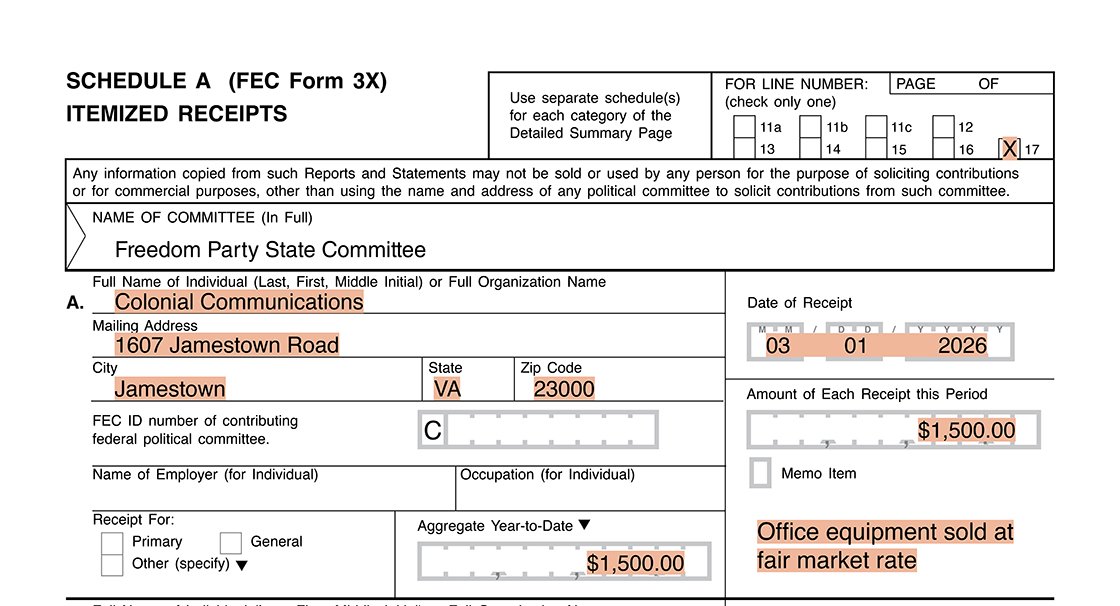
The committee reports the sale of assets, office equipment, on Schedule A, Line 17. It includes the name and mailing address of the purchaser. It also includes the date of receipt, amount of receipt and aggregate year-to-date total received from the purchaser. The committee includes a notation describing the type of assets sold and that the assets were sold at a fair market rate.
Note: if the party committee sells the good or service for more than the usual and normal charge, the difference between the two is considered an in-kind contribution to the party committee. Alternatively, if the committee sells the good or service for less than the usual and normal charge, the difference between the two is considered an in-kind contribution made by the party committee.

Direct reimbursement from candidate committees
When a party committee pays for a good or service and receives a direct reimbursement from a candidate committee, the party committee will report the receipt on Line 15 (Offsets to Operating Expenditure). The entry should specify the original vendor and date of disbursement to the vendor.
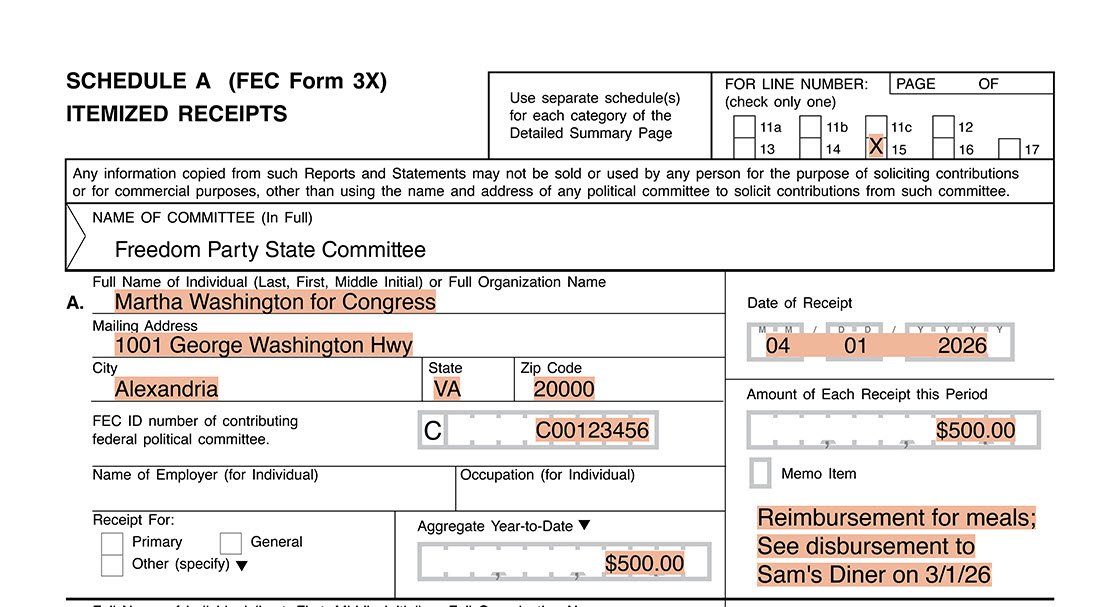
The committee reports a direct reimbursement from a candidate committee on Schedule A, Line 15. It includes the candidate committee’s name, mailing address and FEC identification number. It also includes the date of receipt, amount of receipt and aggregate year-to-date total from the candidate committee. The committee includes a notation with the name of the original vendor and date of disbursement to that vendor.
Reporting with FECFile
To enter a contribution for the proceeds from a sale, go to the Summary Page tab, right click on the line number that corresponds to the contributor type, and select “New.”
To enter a receipt for a sale of assets, go to the Summary Page tab, right click on the "Line 17 Other Federal Receipts," and select "New." Use the “Description” field to explain the type of assets sold and whether or not the assets were sold at a fair market rate.
To enter a receipt for a direct reimbursement from a candidate committee, go to the Summary Page tab, right click on the "Line 15 Offsets to Operating Expenditure," and select "New." Use the “Description” field to provide the name of the original vendor and date of disbursement to that vendor.